Stamp Days 2.0 and 2.1: a new icon, your world by continent, and eleven languages
Stamp Days 2.0 is out with a new icon and a new way to see how much of the world you've visited. Version 2.1, coming next, takes the app from five languages to eleven, including Japanese, Korean and Chinese. Here's what changed, and what localizing for Asia taught me.
Stamp Days: Country Tracker is an iPhone app that counts the days you spend in every country, automatically, in the background. It's for frequent travellers, digital nomads and expats, and anyone who needs to know where they've been and for how long: for the Schengen 90/180 rule, for taxes, or just for the story. It's free on the App Store.
A new icon: from a seal to a real stamp


The old icon was a neat idea that didn't survive the home screen. Its thin white rings and dotted border turned into a faint blur at icon size, and the plane in the middle was too small to read. Next to bolder icons it looked empty.
The app is called Stamp Days, so the new icon is a real rubber stamp: thick rings, a large plane, and the slightly uneven ink you get when you press a stamp onto paper. The mint green and deep navy come straight from the app's own palette. It reads at any size, and it finally looks like the app it opens.
World progress: how much of the world have you seen?
The question people ask most about their travel history isn't "how many days in Portugal?", it's "how many countries have I been to?". Stamp Days 2.0 answers it on the Stats tab:
- Countries out of 195, with a percentage and a progress bar. Free, for everyone.
- The breakdown by continent: Europe 5 of 45, Asia 2 of 47, and so on, each with its own bar. Part of Stamp Days Plus, the one-time purchase.
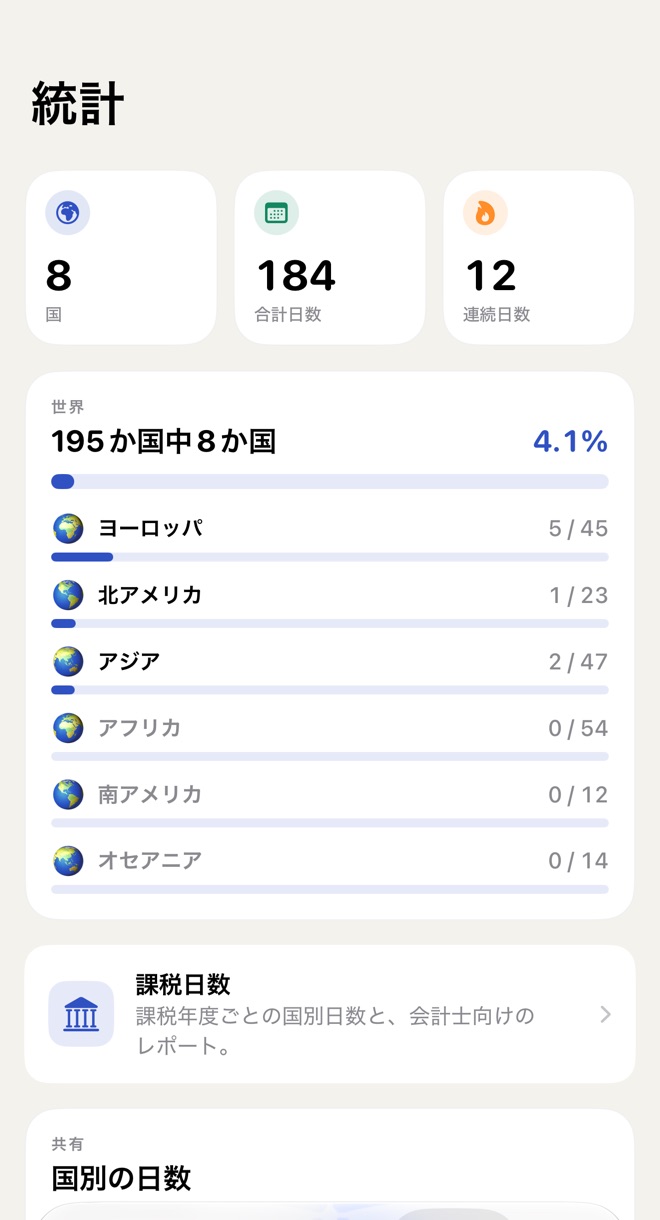
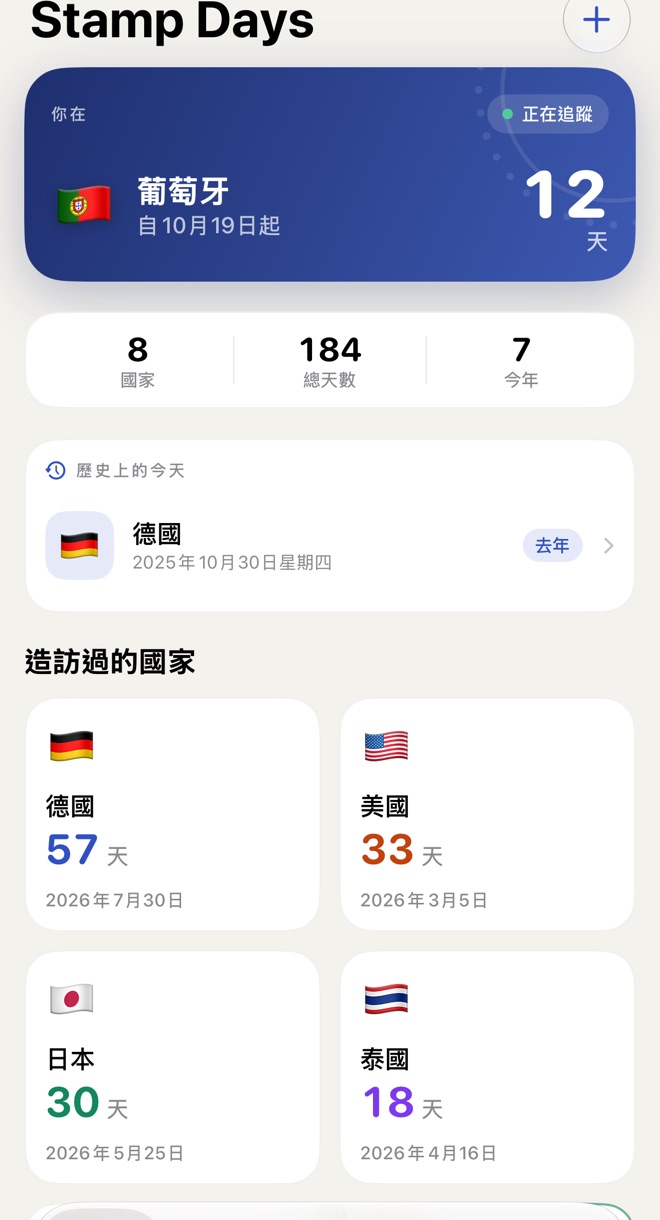
Counting countries sounds simple until you have to decide what a country is. Stamp Days counts the 193 UN member states plus Vatican City and Palestine. Taiwan, Kosovo and territories like Greenland or Puerto Rico are still tracked everywhere else in the app, with every day counted, but they don't change the total. Continents need decisions too: Russia and Cyprus count as Europe, Turkey and the Caucasus as Asia. These rules are covered by unit tests, because a travel app that miscounts your countries loses your trust fast.
Coming in 2.1: eleven languages
Stamp Days already spoke English, German, Spanish, French and Italian (I wrote about what that involved). Version 2.1 adds six more: Japanese, Korean, Simplified Chinese, Traditional Chinese, Dutch and Brazilian Portuguese. That covers every screen, every permission prompt and the widgets, plus a full App Store listing and screenshots in each language. Here's what was different this time.
Traditional Chinese isn't converted Simplified Chinese
It's tempting to write Simplified Chinese and run it through a character converter. The result would be readable in Taiwan, but it would sound like mainland China, because Taiwan often uses different words, not just different characters:
- Settings: 设置 in Simplified, 設定 in Taiwan
- Save: 存储 versus 儲存
- Export: 导出 versus 輸出
- Import from Photos: 从照片导入 versus 從照片匯入
- Countries visited: 到访过的国家 versus 造訪過的國家
So the Traditional Chinese in Stamp Days is written for Taiwan as its own language, not derived from the Simplified one.
Plurals go both ways
Dutch and Portuguese need plural forms ("1 dag", "2 dagen"), which String Catalogs handle with plural variants. Japanese, Korean and Chinese have no plural at all, and Japanese counts countries with its own counter word: "195か国中8か国", 8 of 195 countries. Because every count in the app is one key with variants, never a sentence glued together in code, each language could do what it needs without touching the code.
Dates and numbers come free, if you let them
The Traditional Chinese dashboard shows "2025年10月30日星期四", the Japanese one "2025/05/28". None of that is translated by hand: dates go through the system's formatters, so every language gets its own order, separators and weekday names automatically.
Keywords are research, not translation
The App Store keyword field is 100 characters in every language, and the best keywords are rarely translations of the English ones. In Japanese, one character can be a whole word, so the list holds far more search terms, like ワーホリ (working holiday), 海外赴任 (posted abroad) and 留学 (studying abroad). Simplified Chinese gets 数字游民 (digital nomad) and 打卡, the word people use for checking in at a place they've visited. Korean gets 주재원, someone posted abroad by their company. These are the words people in each market actually type.
Twelve storefronts, screenshots by script
Eleven languages make twelve App Store listings, with Spanish for both Spain and Mexico, and each has ten iPhone screenshots plus screenshots for the foldable iPhone Duo. That's only manageable because the screenshots are captured by a script that runs the app in each language with the same demo traveller. Reviewing all of them also caught a mistake in the old sets: captions still called Photos import, charts and export "Pro" when they're part of Plus. Those are fixed in every language now.
Try it
Stamp Days 2.0 is on the App Store now: automatic day counting, the world map, history, On this day, widgets and World progress are free. Plus is a one-time purchase that adds Photos import, charts, export and the continent breakdown; Pro is a yearly subscription for the Schengen 90/180 calculator and Tax Days (here's how the tiers are split). Version 2.1, with the six new languages, follows soon.
If you read Japanese, Korean, Chinese, Dutch or Portuguese and something in the app sounds off once 2.1 is out, send me an email. A native speaker notices in seconds what I can't.