Localizing three iOS apps into five languages: a practical guide
This month, Stamp Days, Castwave and Kalimba Coach all shipped in English, German, Spanish, French and Italian. Translating the words was the smallest part. Here's what the rest involved, from strings hidden in code to App Store keywords measured in bytes.
Three apps, three platforms, one goal: someone in Madrid, Lyon or Munich should open the app and never notice it was written in English first.
- Stamp Days: Country Tracker (iPhone) counts the days you spend in each country, with a Schengen 90/180 calculator and tax-year reports. About 600 strings, plus the widgets. On the App Store.
- Castwave (Apple TV) is an IPTV player for your own Xtream Codes or M3U playlist. About 300 strings across the app and its Top Shelf extension, localized for version 1.1. On the App Store.
- Kalimba Coach (iPhone and iPad) teaches the 17-key kalimba and listens to your real instrument as you practice. About 300 strings, localized before its first release. Coming soon.
Every app uses Xcode String Catalogs, the same five languages and the same process. That repetition is what made the lessons below stand out.
1. The strings you can't see are the ones that ship in English
SwiftUI makes the first 80% easy: every Text("Favorites") lands in the String Catalog by itself. The rest hides in code. A section title that comes from an enum, a genre name, a sort order, an error message from a network layer, a progress line during an import: none of these are string literals inside a view, so Xcode never sees them.
In Castwave that meant section titles, genres, sort orders, picture modes, import progress, provider errors, player controls and the Top Shelf section names. All of them now go through String(localized:). The quickest way to find the stragglers was not a code search but the screen: run the app in German and look for anything English.
- Model types that end up on screen should return
String(localized:)or aLocalizedStringResource, not a raw string. - Mark brand names and technical terms (Castwave, Xtream Codes, M3U, HEVC) as "Don't translate" in the catalog, so they don't show up as missing in every language.
- Extensions need their own catalog. Castwave's Top Shelf and Stamp Days' widgets each have one.
2. Don't build sentences from pieces
A paywall line like "$3.99 per month" looks like it could be assembled from a price, the word "per" and a unit. In German, French or Italian the order and the grammar change, and the assembled version reads like a machine wrote it. Castwave's paywall now has one whole sentence per plan, with the price as a single argument, so each translator can put it where it belongs.
Numbers need the same care. "7-day free trial", "3 seasons" and "120 channels loaded" each have a plural variant in the String Catalog, because "1 seasons" is wrong in English and the rules are different again in the other four languages.
Two more details from Castwave that are easy to miss:
- Country names come from the system. The country filter asks
Localefor each country's name instead of keeping a translated list, so "Deutschland", "Allemagne" and "Alemania" are always right. - Data the app created is data too. The default Favorites folder is now created in the viewer's language. People who already had an English "Favorites" folder keep it, and the app still recognizes it as the default.
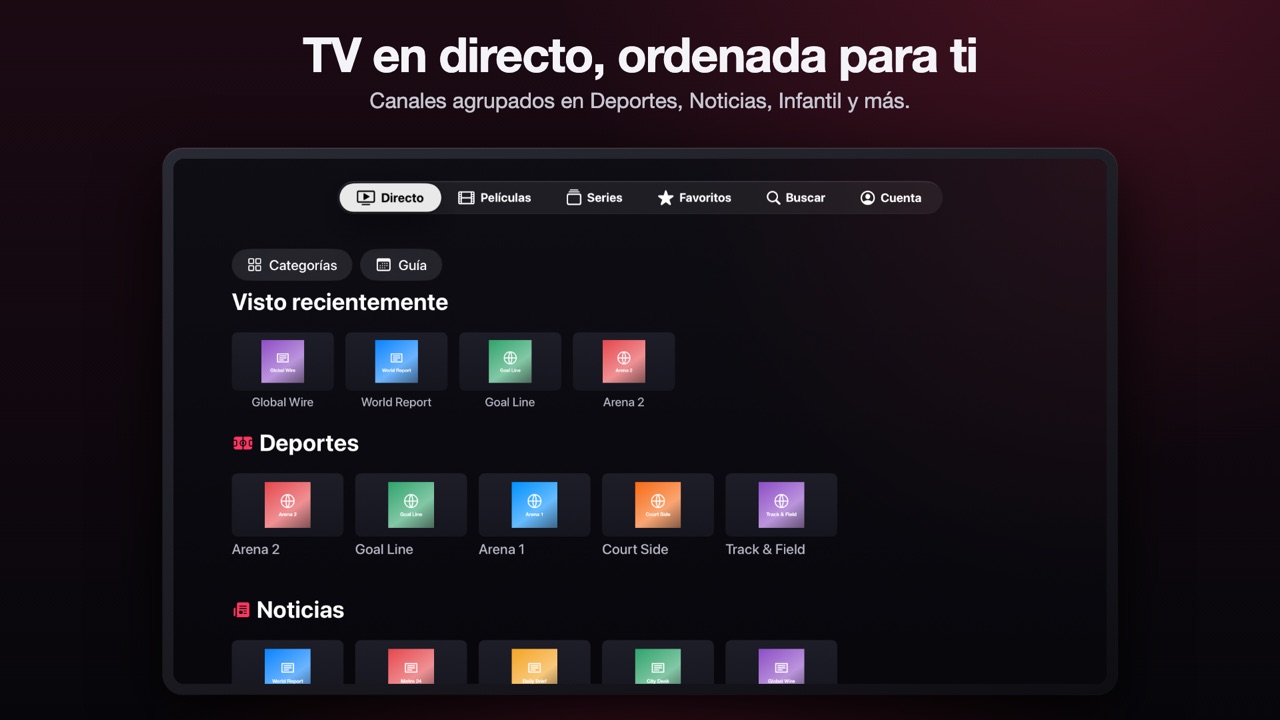
3. Every platform has a place where text runs out
On Apple TV that place is the tab bar. It has a fixed width, and tvOS cuts off whatever doesn't fit. "Live TV" became "TV en directo" in Spanish and "TV en direct" in French, and Account fell off the end of the bar. The fix was a shorter, still natural label: "Directo", "En direct" and "In diretta". The App Store headline above it can still say "TV en directo", because it has the room.
On iPhone it's buttons and segmented controls; on iPad App Store screenshots it was the headlines, which I kept to one line in every language. German is usually the longest, so it's the language I check first on every new screen.
4. Some things change with the language that aren't words
Kalimba Coach had the most interesting case. Musical note names are part of the language. German calls B "H". French, Italian and Spanish use Do Re Mi, and say Si where English solfège says Ti. So the tuner reads "E4" in English, "Mi4" in French, and the note labels everywhere follow the app's language, not just the menus.
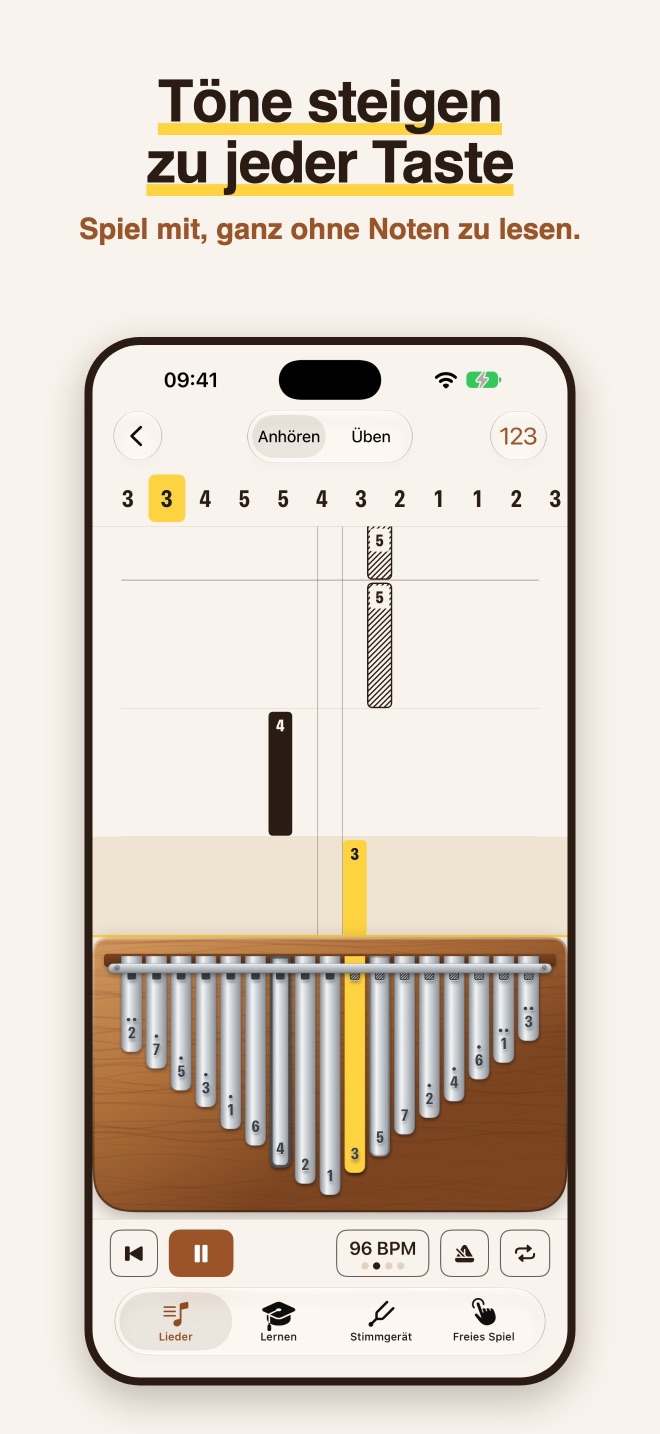
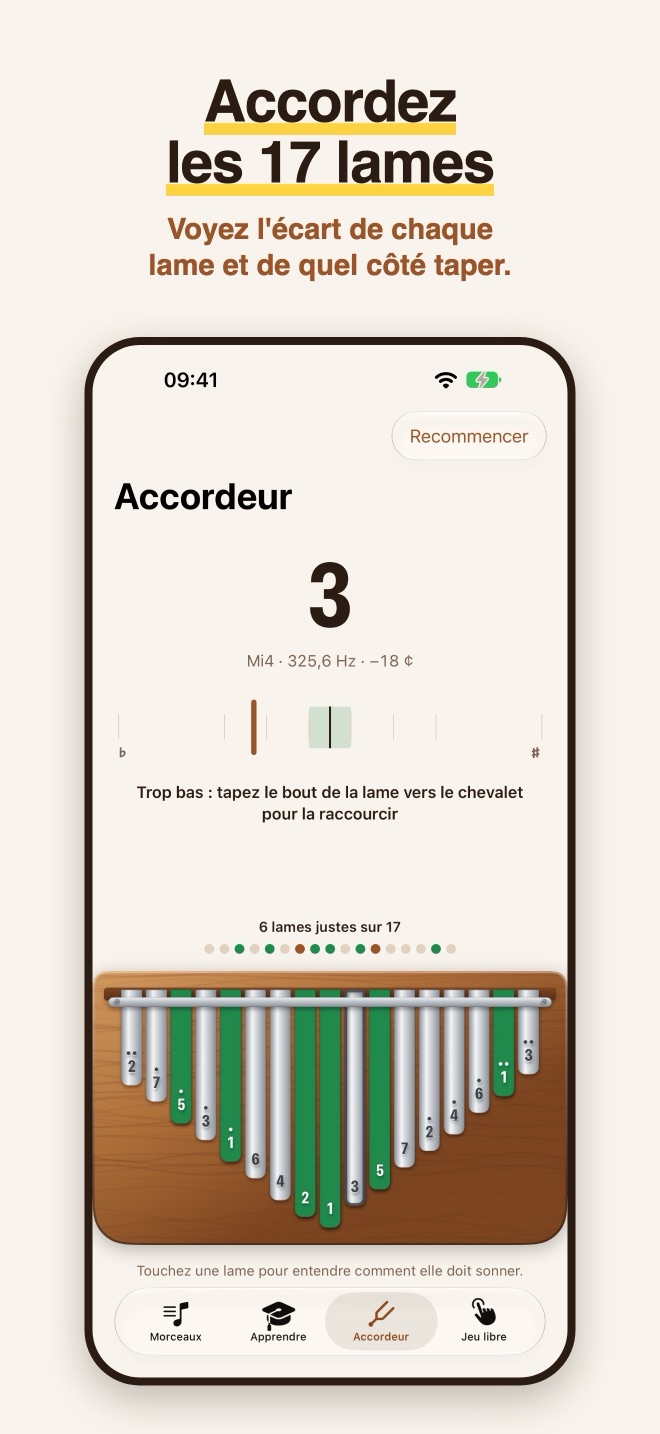
Number formatting is the quieter version of the same thing: 325,6 Hz in French and German, 325.6 Hz in English. Format numbers and prices with the system's formatters (formatted(), displayPrice) and never by hand. That also covers currency: when Kalimba Coach shows how much the yearly plan saves, it works the number out from StoreKit's localized displayPrice.
5. The App Store listing is a second localization project
Translating the app doesn't translate its store page. Each app got its own listing per language: name and subtitle, description, keywords, What's New, and screenshots.
- Keywords are 100 bytes, not 100 characters. In UTF-8, é, ü and ñ take two bytes each, so a French or German keyword list fits less than an English one. Count bytes before you paste.
- Regional storefronts are worth a separate listing. Castwave has Spanish for Spain and for Mexico; Kalimba Coach adds French for Canada. The language is close, but the keywords people search with aren't always the same.
- A store listing can go further than the app. Castwave also has listings in Turkish and Arabic. Those descriptions say plainly that the app itself is in English, and the screenshots fall back to English. Being honest there avoids disappointed reviews.
- What's New counts too. Stamp Days 1.8, with widgets in the app's own design and a Home Country setting for On this day, went out with its release notes in all five languages.
6. Screenshots: script them, then look at every one
Five languages times nine Apple TV screenshots is 45 images for Castwave alone. Doing that by hand isn't realistic, and redoing it after one small change is worse. So every app can now be captured by a script:
- Launch the simulator build with
-AppleLanguages (de)and-AppleLocale de_DE, one language at a time. - Debug-only launch arguments open a specific screen with demo data, such as the guide, the sign-in page or a movie's detail page, so every language gets exactly the same shot.
- A second script adds the device frame and a headline written for each language, not translated word for word.
The script doesn't replace looking. Going through each set one by one is how Castwave's untranslated "N channels" counter, a sign-in subtitle that truncated in French, and the tab bar problem above were found. Nothing else caught those.
What I'd tell anyone starting
- Move to String Catalogs first, including Info.plist and every extension. Give the Info.plist catalog English values too (I wrote about why in the Kalimba Coach post).
- Search the code for strings that reach the screen without passing through
String(localized:). - Use plural variants and whole-sentence strings, and the system's formatters for numbers, prices, dates and country names.
- Run the app in German before anything else. If it fits in German, it usually fits everywhere.
- Script your screenshots, then read every one of them.
Try the apps in your language
If you speak German, Spanish, French or Italian, I'd love to hear how these read to you. A native speaker spots in seconds what I can't.
- Stamp Days: Country Tracker for iPhone: free, with optional Plus and Pro. More about Stamp Days.
- Castwave for Apple TV: free to download, Castwave Pro monthly or yearly with a free trial. More about Castwave.
- Kalimba Coach for iPhone and iPad: coming soon, and you can play the kalimba on its page right now.
Spotted a translation that sounds off? Send me an email, and it'll be fixed in the next update.